
Nightingale: Music Player

Pixie
Contributor
1 min read
တေးဆိုငွက်ကလေး Nightingale
Songbird လို့ပြောလိုက်ရင် Linux သုံးတဲ့လူတွေတော်တော်များများ ရင်းနှီးခဲ့ကြမယ့် music player တစ်ခုကိုပြေးမြင်မိကြမှာပါ. ၂၀၁၀ songbird အဆုံးသတ်ပြီးနောက်မှာတော့ မျိုးဆက်သဈ open source player “Nightingale” ကို songbird community က fan တစ်ယောက်က develop လုပ်ခဲ့တာပါ. ဒါကြောင့် nightingale ဟာ songbird ရဲ့ source code ကိုယူသုံးထားတဲ့ free open source music player တစ်ခုလို့လည်းယူဆနိုင်ပါတယ်. ဒီ nightingale ဟာ သူ့ရဲ့ တော်တော်အဆင်ပြေတဲ့ UI နဲ့ cross-platform feature တွေကြောင့် Linux community ဘက်မှာ တစ်ကယ်ကို လေးစားစရာ music player တစ်ခုဖြစ်ခဲ့ပါတယ်.
Nightingale ကို သူ့UI နဲ့ function စုံတာတွေကြောင့် OSအစုံမှာ လူတော်တော်သုံးကြတာများပါတယ်. ပြီးတော့အဲ့ကောင်က digital sea မှာသုံးတဲ့ audio format တွေအကုန်လုံးကို support ပေးတဲ့အတွက် တော်တော်အဆင်ပြေတယ်လို့ပြောရမှာပါပဲ. ဒါ့အပြင် nightingale ကို Mozilla’s XULRunner ရဲ့ core မှာမှ တစ်ခြား GStreamer media framework လို libtag လို libraries တှေ နဲ့ develop လုပ်ထားတဲ့အတွက် media tagging လို playback support လို function တွေအတွက် add-on တွေထည့်လို့ အဆင်ပြေပါတယ်. ဒါဟာ nightingale ရဲ့ ထင်ရွားတဲ့အပိုင်းတွေထဲကတစ်ခုပါ.
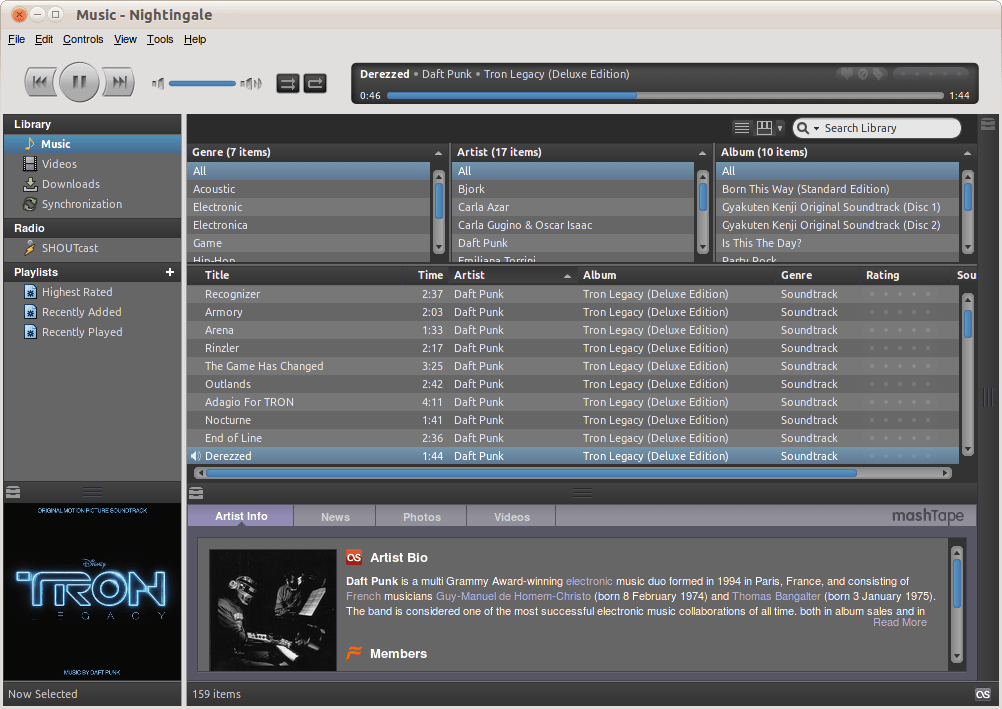
နောက်တစ်ခုက Nightingale ရဲ့ UI ကို user ကိုယ်တိုင် customize လုပ်လို့ရပါတယ်. CSS နဲ့ ရင်းနှီးပြီးသား user တှကေတော့ CSS ကိုသုံးပြီးပြင်နိုင်ပါတယ်. တစ်ခြား GIMP လို program သုံးပြီးလည်း ပြင်နိုင်ပါသေးတယ်.
Features in Nightingale
-
free and opensource
-
mp3, FLAC, AAC, Apple Lossless, WMA အစရှိတဲ့ audio format တှကေို support ပေးခြင်း
-
music customization ကို support ပေးခြင်း
-
Window, Linux, mac os တှကေို 32-64 architecture နဲ့ cross-platform support ပေးခြင်း
-
Scrobbling ပါ အပါ Last.fm ကို support ပေးခြင်း
-
Offers metadata editor
-
EQ presets
-
Apple’s FairPlay encoded audio files တှကေို run နိုင်ခြင်း
-
Users တှဟော CLI သုံးပြီး playback ကို ထိန်းနိုင်ခြင်း
-
UI လွပြီး ကိုယ်တိုင်ပြင်ဆင်လို့ရခြင်း
-
mp3 download လို့ရပြီး mp3 blog တှကေိုပါ subscribe လုပ်လို့ရခြင်း
How to Install
sudo add-apt-repository ppa:nightingaleteam/nightingale-release
sudo apt update
sudo apt-get install nightingale
Official site ကလည်း သွားရှာ download ခလျို့ရပါတယ်.
More in Application & Softwares
SuperPaper 2.0
Windows နဲ့ Linux အတွက် အဆင့်မြင့် Multi Monitor Wallpaper App တစ်ခုဖြစ်တဲ့ Superpaper 2.0 ပြီးခဲ့တဲ့နှစ်က Linux နဲ့ Windows အတွက် အဆင့်မြင့်တဲ့ multi monitor wallpaper tool…
 Ko Ko Ye
2 min read
Install Myanmar(Unicode) Keyboard and font on Raspberry Pi
ဒီနေ့ပြောမယ့် အကြောင်းအရာကတော့ Raspberry Pi ပေါ်မှာ Myanmar လို ရိုက်လို့ရအောင် ဘယ်လိုလုပ်ရမလဲဆိုတဲ့ အကြောင်းအရာလေးပဲ ဖြစ်ပါတယ်။ ကျွန်တော် Test လုပ်မယ့် device ကတော့ Rpi 3 mobel…
 Khant Phyo
1 min read

Folding@Home Project – CoronaVirus
Corona Virus အကြောင်း မပြောခင်မှာ သူနဲ့ ပတ်သက်တဲ့ အကြောင်းအရာတွေ အရင် ပြောရအောင်.. ပထမဆုံး Protein ပေါ့ .. ပရိုတင်း တွေက ကျွန်တော်တို့ နေ့စဉ် လုပ်ငန်းဆောင်တာတွေ (ဥပမာ – အရသာ…
Ko Ko Ye3 min read