
Re-enable right click button in Touchpad Ubuntu 18.04

Co Hein
Contributor
1 min read
သတိထားမိကွမလား မသိဘူး။
Ubuntu 18.04 ရဲ့ Touchpad မှာ right click button အလုပ်မလုပ်တော့ပါဘူး။ Right click ကို သုံးချင်ရင် 2 fingers နဲ့ touch ရပါတယ်။ အရင် version တွေမှာတော့ 2 fingers နဲ့ရသလို button နဲ့လည်း ရပါတယ်။
တကယ်တော့ ဒါက Bug မဟုတ်ပါဘူးတဲ့။ Ubuntu 18.04 ရဲ့ Feature တစ်ခုပါ။
ကျွန်တော်တို့ ဒါကို ပြန်ပြီး enable ပေးလို့ရပါတယ်။
Gnome Tweak Tools မသွင်းရသေးရင် သွင်းလိုက်ပါ။
$ sudo apt install gnome-tweak-tool
Super(Win) key နှိပ်ပြီး Tweak ဆိုပြီးရှာဖွင့်ပါ။
Tweak>>Keyboard & Mouse ကိုသွားပါ။
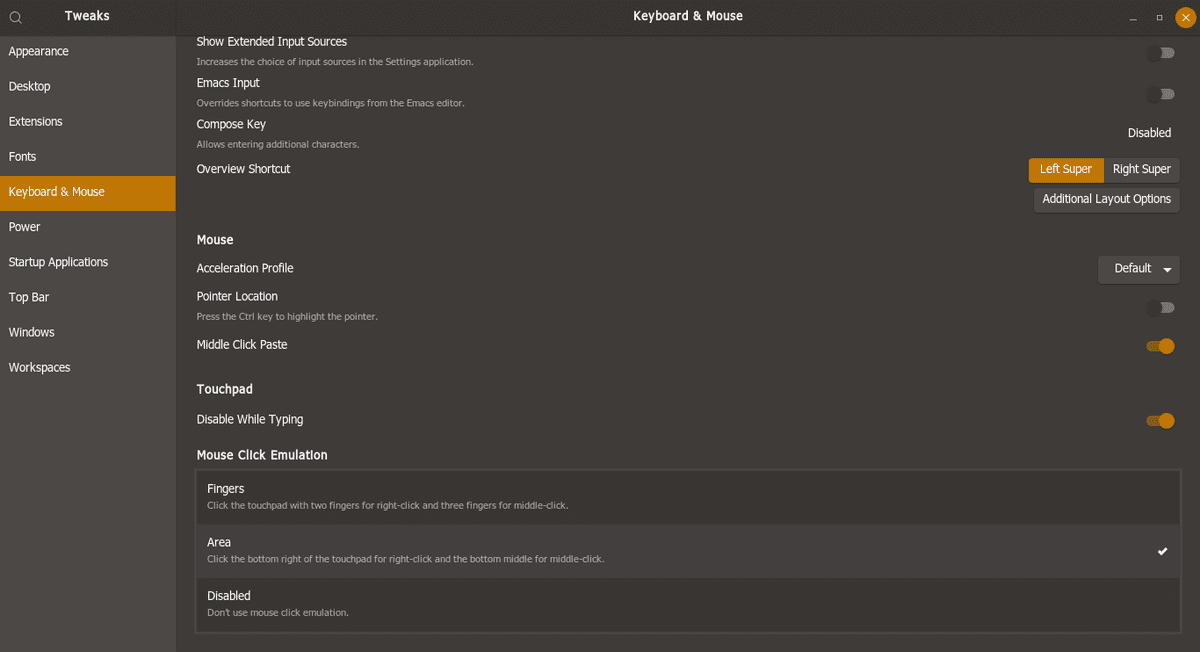
အဲ့ဒီမှာ Mouse Click Emulation ဆိုတာတွေ့ပါလိမ့်မယ်။ Option 3 ခုရှိပါတယ်။
အပေါ်ဆုံးက Fingers က 2 Fingers ကို Right click နဲ့ 3 Fingers ကို Middle click အဖြစ် သုံးပါမယ်။ Button အလုပ်မလုပ်ပါဘူး။
ဒုတိယ Area က Fingers ရော Button နဲ့ရော အလုပ်လုပ်ပါမယ်။
တတိယ Disabled က Mouse click Emulation ကို မသုံးပါဘူးတဲ့။
ကျွန်တော် စမ်းကြည့်တာတော့ Disable ရွေးရင်လည်း Option 1> Fingers အတိုင်းအလုပ်လုပ်ပါတယ်။ Button အလုပ်မလုပ်ပါဘူး။
More in Tutorials

Git multi account
Developer အတော်များများဟာ Email တခုနဲ့ ssh key ၂ ခု ၃ ခုလောက်ထပ် ပိုသုံးကြလေ့ မရှိပါဘူး။ Personal Development နဲ့ Contract Project တွေ Freelance Project တွေမှာ အကောင့်တခု အီးမေးလ်…
 Ko Ko Ye
4 min read
Packet tracer 7.2.2 installation on Ubuntu (libpng12.so.0 – solved)
ပထမဆုံး https://www.netacad.com/courses/packet tracer ကနေပြီးတော့ packet tracer course ကို enroll လုပ်ပြီး packet tracer ကိုဒေါင်းလုတ် လုပ်ပါ.. အဲ့ကနေ မ down တက်ရင်လဲ…
 Khant Phyo
2 min read

Disable/Enable Touchpad in Ubuntu
ကျွန်တော်တို့ Laptop ကို mouse တပ်ပြီး သုံးတဲ့အခါ အများစုက Touchpad ကို Disable လုပ်ထားချင်မှာပဲ။ ကျွန်တော်တို့ စာရိုက်တဲ့အခါ Touchpad ကိုထိမိရင် ရိုက်နေရင်း…
 Co Hein
1 min read