
Keymagic 1.5.2 (ibus-keymagic) – deb download

Ko Ko Ye
Founder
1 min read

KeyMagic 1.5.2 Trusty Tahr (ibus-keymagic) အတွက် PPA ကို ရေးသားပြီးဖြစ်ပါသည်။
Internet ချိတ်ဆက်မထားသော Ubuntu များအတွက် ထည့်သွင်းအသုံးပြုနည်း
မိမိစက်၏ Processor အမျိုးအစားကို System System > Detail တွင်ကြည့်ပါ။ ကိုက်ညီသော Version ကို Download ရယူပါ။
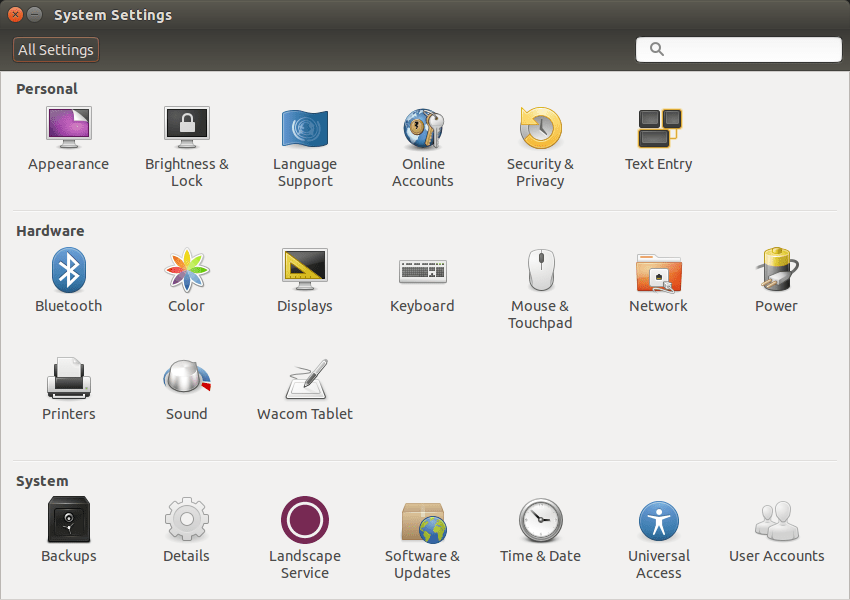
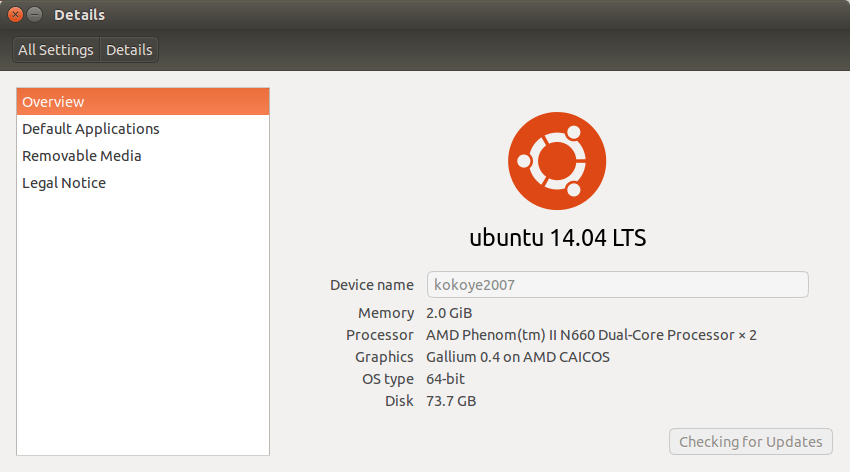
Terminal ကို အသုံးပြုပြီးလည်း ကြည့်ရှုနိုင်ပါသည်။ Ctrl+Shift+T
uname -imp

Ubuntu 14.04 Trusty Tahr အတွက်
12.04 ကဲ့သို့သော Version အဟောင်းများအတွက် keymagic.googlecode.com မှ သွားရောက် ရယူအသုံးပြုနိုင်မည်ဖြစ်ပါသည်။
Download ရယူထားသော ဖိုင်များကို Click ဖြင့်သော်၎င်း Terminal မှသော်၎င်း ထည့်သွင်း အသုံးပြုနိုင်ပါသည်။
Terminal မှ ထည့်သွင်းအသုံးပြုရန်
sudo dpkg -i ~/Downloads/ibus-keymagic*.deb
သို့မဟုတ်
sudo dpkg -i
ဟု Terminal တွင် ရိုက်ပြီး Download ရယူထားသောဖိုင်ကို Drag ဆွဲပြီး Terminal ပေါ်သို့ တင်ပါကလည်း ရပါသည်။
ထိုသို့ပြုလုပ်ပါက အောက်ပါ အတိုင်း ပေါ်လာပါလိမ့်မည်။

Enter ခေါက်ပြီးအတည်ပြုပါ။ Password တောင်းပါလိမ့်မည်။
Password ရိုက်ချျိန်တွင် Security Reason အရ အခြား OS/Web များတွင်ကဲ့သို့ **** ပင်ပေါ်မည်မဟုတ်ပါ။
မှန်ကန်အောင် ရိုက်သွင်းပြီး Enter ခေါက်ပါ။
အကယ်၍ Error တစ်စုံတစ်ရာ ပေါ်ပေါက်ပါက Error Log များကို မှတ်သား၍ အကြောင်းကြားပေးရန် မေတ္တာရပ်ခံပါသည်။
More in Application & Softwares

Git multi account
Developer အတော်များများဟာ Email တခုနဲ့ ssh key ၂ ခု ၃ ခုလောက်ထပ် ပိုသုံးကြလေ့ မရှိပါဘူး။ Personal Development နဲ့ Contract Project တွေ Freelance Project တွေမှာ အကောင့်တခု အီးမေးလ်…
 Ko Ko Ye
4 min read
Packet tracer 7.2.2 installation on Ubuntu (libpng12.so.0 – solved)
ပထမဆုံး https://www.netacad.com/courses/packet tracer ကနေပြီးတော့ packet tracer course ကို enroll လုပ်ပြီး packet tracer ကိုဒေါင်းလုတ် လုပ်ပါ.. အဲ့ကနေ မ down တက်ရင်လဲ…
 Khant Phyo
2 min read
Raspberry Pi Multiboot with berryboot – Parrotsec run GNS3 cisco on RaspberryPi
RaspberryPi Multiboot with berryboot Parrotsec run GNS3 cisco on RaspberryPi ပထမဆုံး Browser ကနေပြီတော့ https://sourceforge.net/projects/berryboot/ berryboot zip file ကို ဒေါင်းပါ…
Ko Ko Ye2 min read